




In recent years, ergonomics has become an increasingly discussed topic. With the growing prevalence of sedentary occupations, a significant body of research has emerged examining the effects of such work patterns on the human body. Despite this attention, the concept of ergonomics is often perceived as abstract or unclear, and many individuals find it difficult to relate it directly to their workstation, office environment, or organizational practices. More importantly, there is still limited awareness of how office ergonomics can influence aspects of life beyond the workplace.
What is Ergonomics and What Are Its Applications?
Ergonomics is a science‑based discipline dedicated to maximizing human performance while minimizing the risk of injury. The term ergonomics refers to the “science of work” and is derived from the Greek words ergon (work) and nomos (laws). The terms “ergonomics” and “human factors” are often used interchangeably or in combination.
Human Factors and Ergonomics (HFE) examines a wide range of elements, including physical, cognitive, social, technical, organizational, and environmental factors, as well as the complex interactions between humans and the systems with which they interact. These systems may involve other people, environments, tools, products, equipment, and technologies. Ergonomics specialists study human capabilities and limitations in relation to work activities. Today, the concept is commonly summarized as the science of designing jobs and systems to fit the worker, rather than forcing the worker to adapt to the job.
Ergonomics encompasses all aspects of work. This includes physical stresses that affect joints, muscles, nerves, tendons, and bones, as well as environmental conditions that influence hearing, vision, comfort, and overall health.
Ergonomics is therefore considered both a scientific field and a professional practice. As a science, it seeks to understand how humans interact with other components of a system. As a profession, its objective is to enhance human well‑being and improve overall system performance through the application of research findings, principles, theories, and established methods.
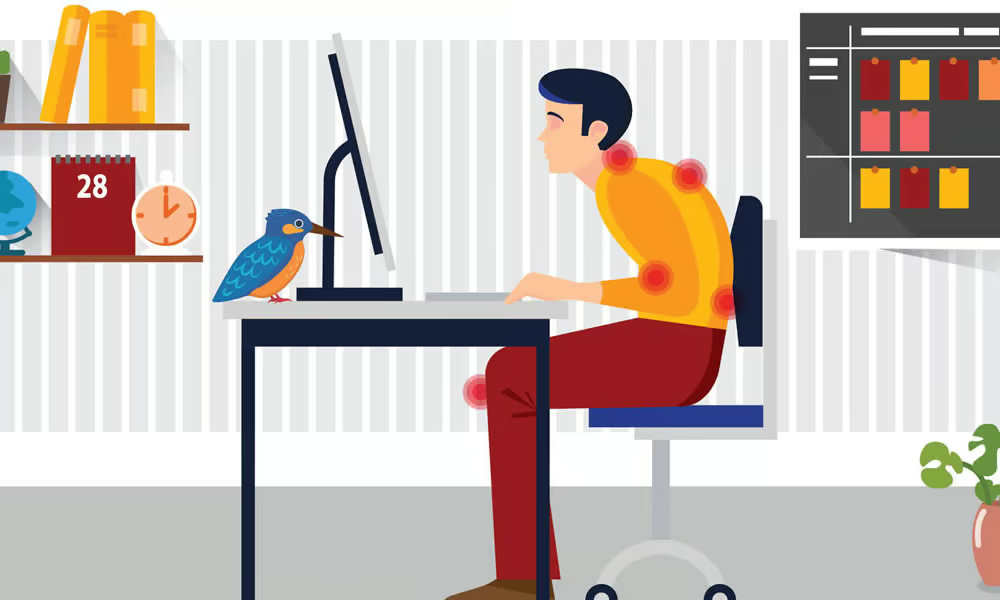
The primary objective of ergonomic intervention is to adapt the work environment to the needs of the worker, rather than forcing the worker to adapt to the work. For instance, when a desk is positioned too high relative to a person’s height, the individual may compensate by slightly elevating their shoulders to perform tasks comfortably.
Over time, however, maintaining this posture on a daily basis can lead to discomfort or pain in the neck and upper back. An appropriate ergonomic intervention in such a situation might involve lowering the desk height or raising the chair—along with making other necessary adjustments. When the work environment is properly adapted to the worker’s needs, the likelihood of experiencing pain, discomfort, or injury is significantly reduced.
In addition, several factors influence how individuals sit and perform tasks in the workplace. These include the type of keyboard and mouse used, lighting conditions and glare, clothing and accessories, and even personal lifestyle factors such as being sedentary or physically active. Ergonomics considers all of these elements and recommends adjustments based on the intended outcomes. Such outcomes may include reducing physical discomfort, improving productivity, lowering costs associated with workplace injuries and compensation, or achieving a combination of these benefits.
What is the importance of ergonomics?
Applying ergonomic principles in both the workplace and daily life can improve productivity, reduce fatigue, and prevent musculoskeletal disorders. Poor ergonomics is a major cause of repetitive strain injuries and back pain—one of the leading reasons for workplace absenteeism. Research shows that improving workstation and chair design can significantly reduce absences and increase productivity.
Studies in the United States have reported productivity gains of up to 15 percent following ergonomic interventions. Given that nearly 80 percent of individuals experience back pain during their lifetime, investing in proper ergonomics not only protects employee well-being but also enhances organizational performance. Ergonomics is therefore not simply about comfort; it directly impacts efficiency, costs, and overall business success.
Know the main types of ergonomics
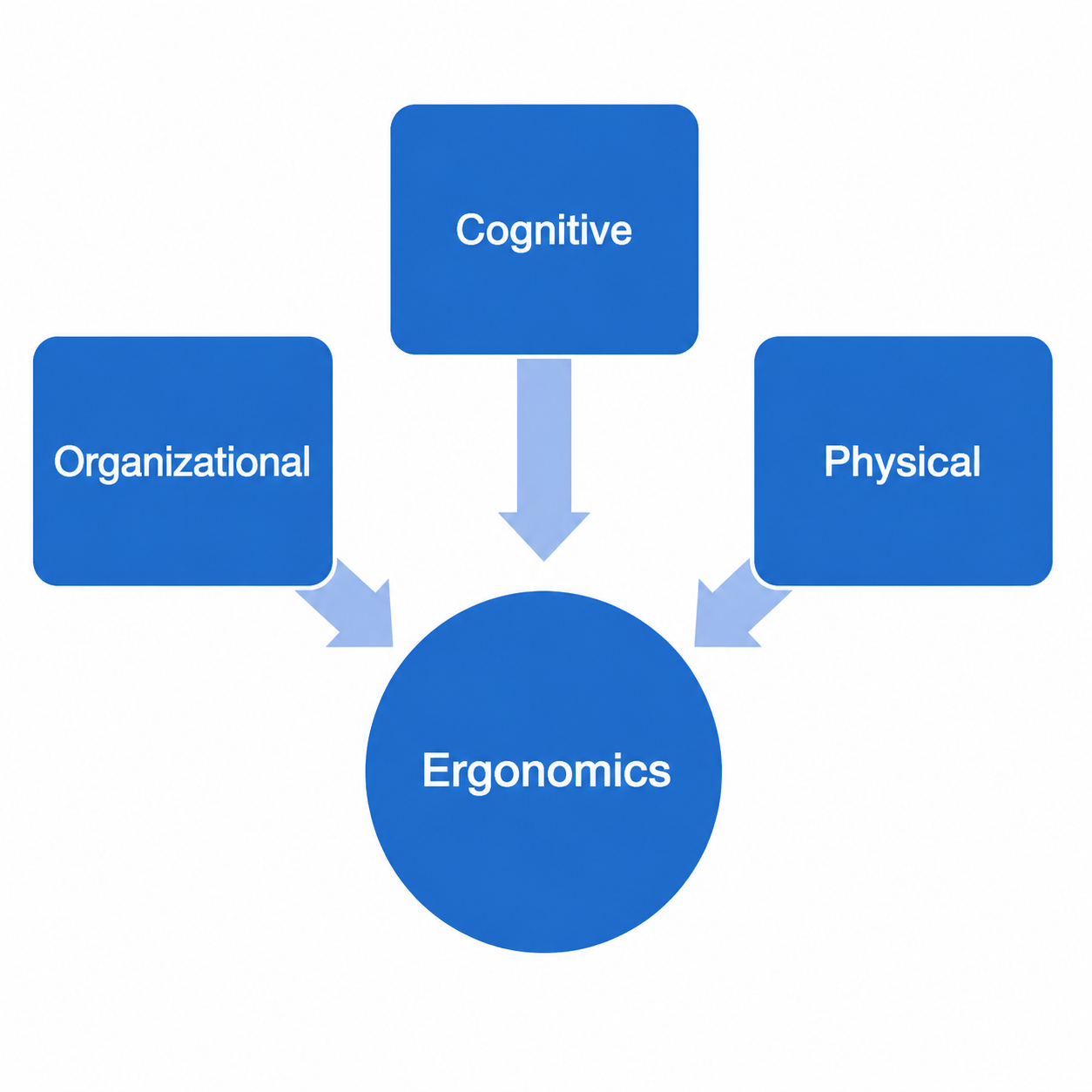
Human Factors and Ergonomics (HFE) can be broadly categorized into three principal subfields: physical ergonomics, cognitive ergonomics, and organizational ergonomics. This classification helps researchers and practitioners assess both the individual and combined effects of these dimensions on people operating within a system.
In simple terms, physical ergonomics is concerned with the human body and its physical characteristics, cognitive ergonomics focuses on mental processes and human cognition, and organizational ergonomics addresses the structures, systems, and distinctive cultures within which people work.
A. Physical Ergonomics
Physical ergonomics focuses on the physical demands placed on the human body during activities such as work, exercise, household tasks, or exposure to harmful noise. In other words, it examines the physical strain and injuries that may result from performing such activities.
This area of ergonomics addresses topics such as risk assessment, heavy manual labor, repetitive tasks, and sedentary work. It is primarily concerned with the physical pressures imposed on the body and the ways in which these pressures affect human performance and well-being. A general framework has been developed to explain how exposure to physical stressors can influence the body. These stressors require individuals to adopt different postures, perform various movements, and withstand external forces. Over time, such demands can lead to mechanical and physiological responses that depend directly on the physical capacities of the user or operator.
Physical ergonomics is closely related to anatomy, anthropometry, biomechanics, physiology, and the physical environment, all of which shape human physical activity. Key areas of focus include the effects of repetitive motion, manual material handling, workplace safety, comfort in the use of portable devices, keyboard design, working postures, and the overall work environment.
Certain factors increase the likelihood of ergonomic injuries, also referred to as work-related musculoskeletal disorders (WMSDs). These injuries may manifest as pain in the back, neck, or shoulders, carpal tunnel syndrome, or other symptoms such as numbness in the arms or legs, swelling in the feet, and even psychological strain. The main contributing risk factors are outlined below:
- Continuous awkward posture (e.g., a dentist leaning over to examine your teeth)
- Constant vibration (exposure to vibrating positions, such as working with electric demolition hammers)
- Exertion of excessive force (for example, when pushing or pulling objects)
- Localized pressure (e.g., resting the forearm on a sharp desk edge)
- Exposure to extreme heat or cold
- A combination of two or more of the factors mentioned above
- Inappropriate working positions
- Severe psychological stress and pressure
Several harmful situations in physical ergonomics that require greater attention are listed below.
These refer to postures or positions that can lead to significant long-term injuries. Correcting these harmful positions is one of the primary objectives of physical ergonomics.
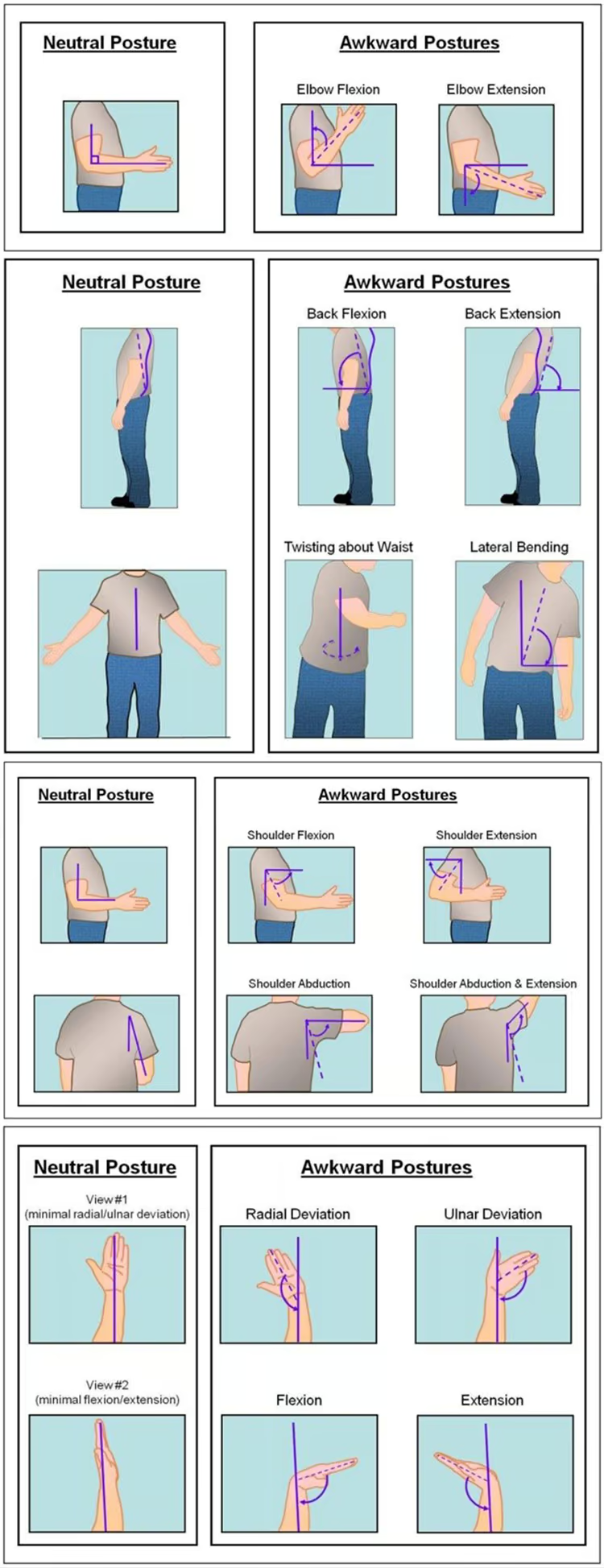
Risk assessment and hazard prevention are fundamental components of physical ergonomics. Prevention is one of its primary objectives and involves implementing strategies that reduce the likelihood of developing musculoskeletal disorders.
Causes of physical injury
These guidelines outline a wide range of potential hazards that may arise in occupational environments. In this section, four major categories of work that may lead to physical injury are examined. For each category, potential hazards, methods of risk assessment, and appropriate preventive measures are systematically discussed.
Heavy work
Heavy work includes tasks that are characterized by large external forces applied to the body. These may result from:
- Lifting heavy loads
- Carrying heavy loads
- Pushing loads
- Pulling loads
Despite the growing level of mechanization and automation in many industrial sectors, the proportion of workers exposed to heavy physical labor has remained relatively stable over recent decades. In the Netherlands, for example, approximately 20 percent of workers are engaged in heavy work. In developing industrial economies, however, this proportion can be significantly higher.
Examples of heavy work include nursing, construction work, metalwork, agriculture, transportation, and logistics.
There is substantial evidence indicating that repeatedly lifting heavy loads is associated with the development of low back pain. Numerous epidemiological studies have investigated this relationship and consistently found that the risk of injury increases with the frequency of lifting tasks. Some research has also suggested a possible link between pushing and pulling activities and shoulder injuries, although the number of studies examining this relationship remains relatively limited.
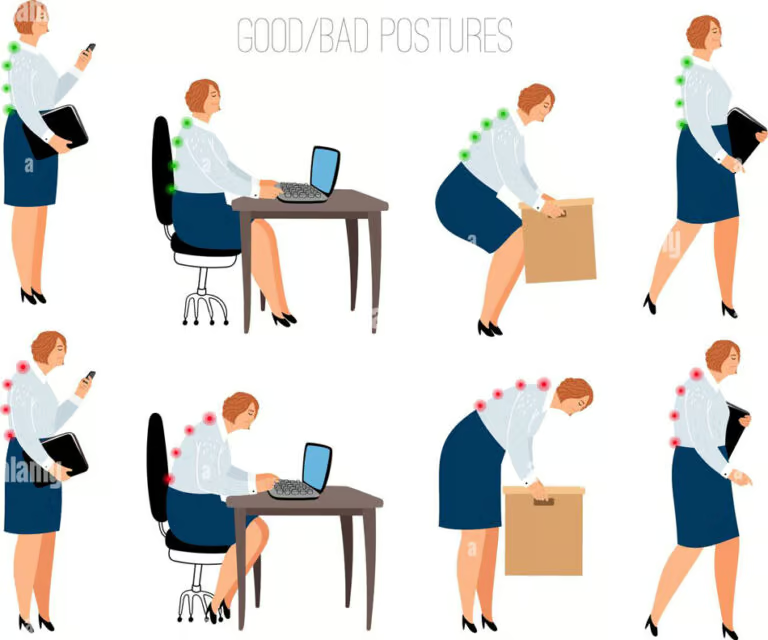
The risk associated with manual lifting is influenced by several critical factors, including the weight of the load, the vertical travel distance, the horizontal distance of the load from the body, and the frequency of the lifting task. These parameters are integrated into the NIOSH lifting equation, which is widely recognized as one of the most comprehensive and practical methodologies for assessing the injury risk associated with manual lifting.
Repetitive work
Repetitive work includes repeated movements of the arms and hands. This type of work is common in many occupations, such as assembly, packaging, computer work, hairdressing, and others.
Computer work is a specific form of repetitive work that mainly involves repeated movements of the hands and fingers. It is clear that the prevalence of this type of work has increased significantly in recent decades.

The types of musculoskeletal disorders associated with repetitive work mainly involve injuries to the neck, shoulder, elbow, and wrist. Several terms are used to classify these types of disorders, such as repetitive strain injury (RSI) or cumulative trauma disorder (CTD).
It has been reported that the duration of work is the primary risk determinant in this type of task. The risk of developing injury increases particularly when the duration of work exceeds six hours per day. Other risk factors include:
- Lack of micro‑breaks (at least 20 seconds every 10 minutes)
- Lack of individual control over work pace
- Mental workload pressure
Static work
Static work is a type of work that involves prolonged standing and sustained, fixed postures of the lower back, neck, and arms.
- Prolonged standing: Prolonged standing—typically defined as standing for more than four hours per day without regular walking—is common in many occupational sectors, including healthcare, hospitality, retail, and security. The musculoskeletal and health issues associated with extended standing are primarily related to chronic venous insufficiency, such as varicose veins, as well as musculoskeletal pain in the lower back and legs.
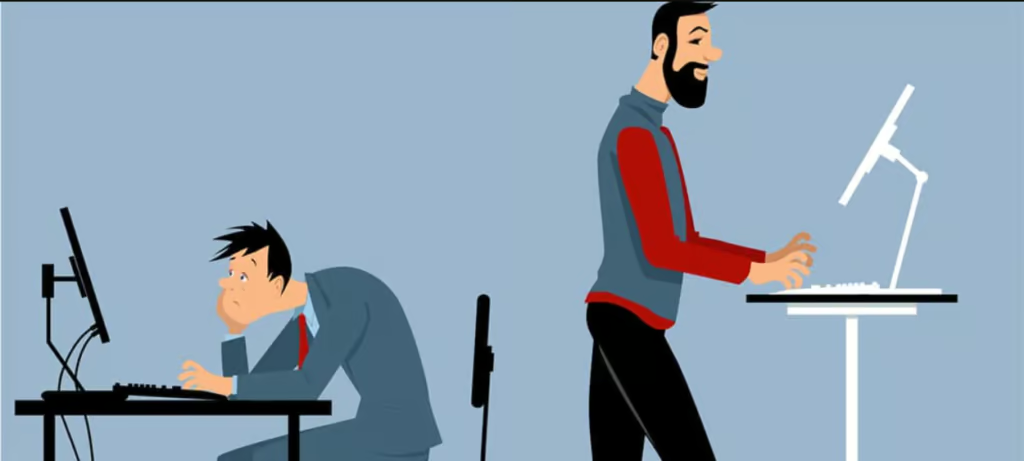
- Maintaining prolonged postures: Similar to repetitive tasks, prolonged postures are prevalent in many occupations, including assembly work, packaging, computer-based tasks, hairdressing, and others. Prolonged posture refers to maintaining the same body position for an extended period of time. For example, sitting in a hunched position over a desk for long periods while assembling a product places considerable physical strain on the body. Over time, this sustained load can contribute to various musculoskeletal disorders, particularly affecting the neck, shoulders, and lower back.
- Sedentary work: Many employees perform their work while sitting for prolonged periods. In the Netherlands, individuals sit for an average of five hours per day at work, in addition to approximately 3.5 hours during their private time. Sedentary occupations commonly include office work, security monitoring in control rooms, transportation (such as professional drivers), service positions, and cashier roles. Sedentary behavior is associated with several health risks, including overweight and obesity, insufficient physical activity, and sustained poor postures. Furthermore, prolonged sitting has been linked to an increased risk of gastrointestinal cancers, reproductive disorders, and negative effects on mental health.

Prevention of physical injuries
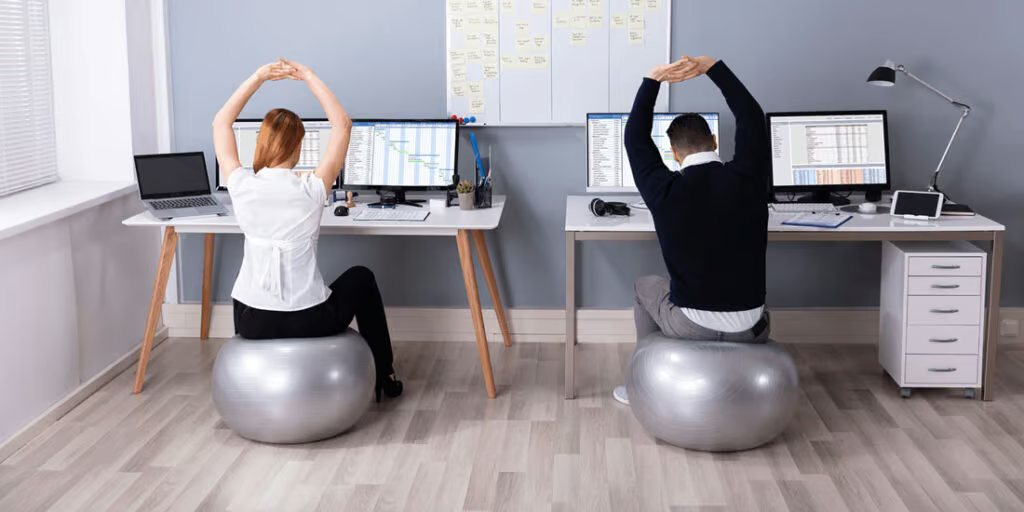
Effective ergonomic workplace design, along with regular changes in body posture, is essential for preventing physical strain and musculoskeletal injuries. Some workstations are equipped with adjustable desks that allow employees to alternate between sitting and standing throughout the day. If such desks are not available, individuals are encouraged to incorporate regular walking into their routine. Health guidelines commonly recommend at least 30 minutes of daily movement, while short breaks during work hours can help reduce additional physical strain. For office workers, walking during lunch breaks is a practical and beneficial option.
Modern ergonomic chair designs also promote more dynamic sitting by allowing users to change posture more easily. Nevertheless, even the most advanced ergonomic furniture cannot completely eliminate the risks associated with prolonged sitting and sedentary work habits.
B. Cognitive Ergonomics
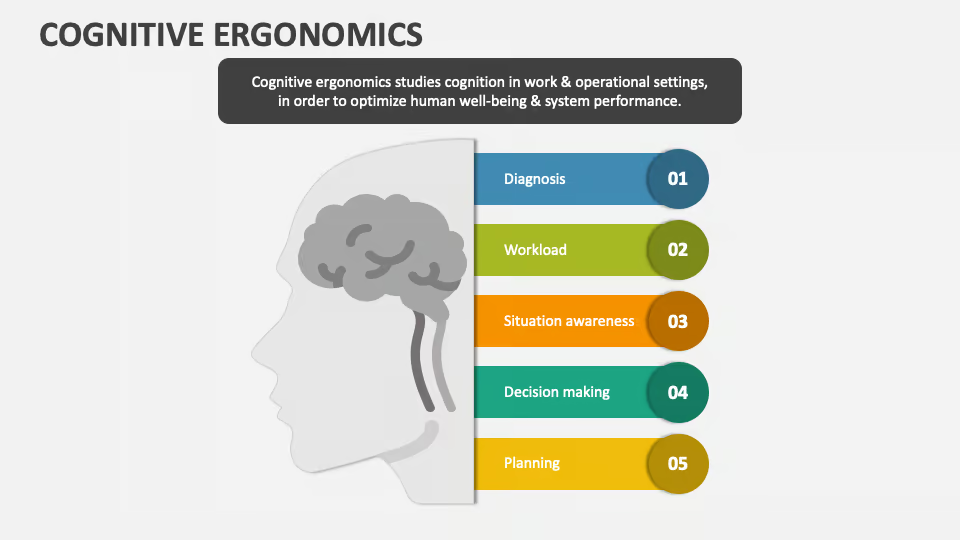
Cognitive ergonomics focuses on the mental processes involved in human interaction with systems, particularly how individuals perceive, process, and respond to information. It is therefore closely related to the quality of human performance within a system. This subfield of ergonomics examines factors such as cognitive abilities, training, decision‑making, and mental workload.
Ergonomists working in this area are also involved in evaluating and improving system design, usability, and human–machine interaction. In addition, they contribute to error analysis and the investigation of workplace incidents in order to enhance safety, efficiency, and overall system performance.
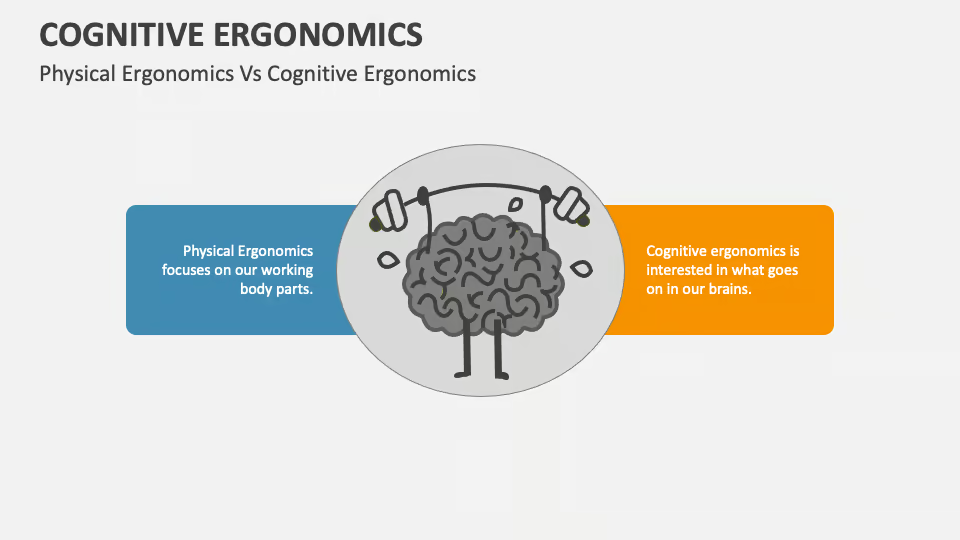
From a product perspective, cognitive ergonomics examines how well the use of a product aligns with users’ cognitive abilities. This involves understanding how the human mind naturally perceives and responds to stimuli, processes that are shaped by both cultural and evolutionary factors.
From a design perspective, ergonomists play an important role in developing products and systems that consider users’ capabilities as well as their limitations. The objective is to create products and systems that are simple, clear, and intuitive to use, thereby enhancing usability and contributing to a positive overall user experience.
Cognitive processes
In ergonomics and psychology, cognition refers to mental processes. Human cognition can be divided into several functions that form the basis of optimal human performance. It is important to identify the cognitive functions relevant to a particular task or job and ensure that the work environment is suitable for the individual.
- Sensation and perception involve the detection and interpretation of stimuli received through the senses, such as sight, hearing, taste, smell, and touch. These processes enable individuals to recognize and respond appropriately to environmental cues. For example, in construction work, the ability to hear warning signals is essential for maintaining safety. If a worker has hearing impairments, the job may not be suitable, as it could disrupt the work process and, in certain situations, pose a risk to both the individual and others.
- Attention is the stage in which cognitive processing focuses on specific aspects of perceived information, or is divided among two or more elements simultaneously. It enables individuals to select relevant information from the surrounding environment while ignoring less important stimuli. For example, in a control room, operators must carefully monitor systems and detect any significant changes in the situation. Similarly, in a kindergarten setting, a caregiver often needs to divide attention among several children at the same time to ensure their safety and well‑being.
- Working memory refers to a short‑term memory system in which information remains temporarily available, typically for up to about 30 seconds. It also involves the mental processes through which information is actively maintained and rehearsed in the mind. For example, a telephone operator may need to remember a caller’s name until the connection is established. Similarly, a laboratory assistant working with multiple samples must keep track of the order and location of the samples while performing the required procedures.
- Long-term memory is a relatively permanent store for different types of information. It involves the retention of knowledge about the world, as well as symbols, concepts, and past experiences. In this context, memory supports the ability to recall and apply information when needed. Knowledge also includes “knowing how,” which relates to practical understanding and skills. In occupational settings, every job requires specific domain knowledge and a set of relevant skills, such as operating equipment safely or organizing and managing a meeting effectively.
What is organizational ergonomics?
Macro-ergonomics, also known as organizational ergonomics, focuses on how organizations and work systems are structured and how they interact with people. Its aim is to improve policies, processes, and organizational structures in order to enhance overall performance and efficiency.
Key areas that may be evaluated include communication, cooperation, resource management, work-time design, participatory design, remote work, quality management, teamwork, and virtual organizations.
Improving physical, cognitive, and organizational ergonomics does not always require high costs. What matters most is identifying the main challenges employees face in their work and addressing them step by step, ideally with the support of an ergonomics specialist, to improve productivity and organizational effectiveness.
Benefits of organizational ergonomics
Ergonomics is a scientific discipline that studies the interaction between workers and the elements of a workplace or system, such as tools and equipment. Its core principle is to fit the job to the worker, rather than forcing the worker to adapt to the job.
This is important because ergonomics helps reduce the risk of employee injury, especially musculoskeletal disorders such as strains, sprains, and other soft-tissue injuries. By creating safer and healthier work environments, ergonomic improvements can also lower the number of workplace injuries and, as a result, reduce workers’ compensation claims along with both their direct and indirect costs.
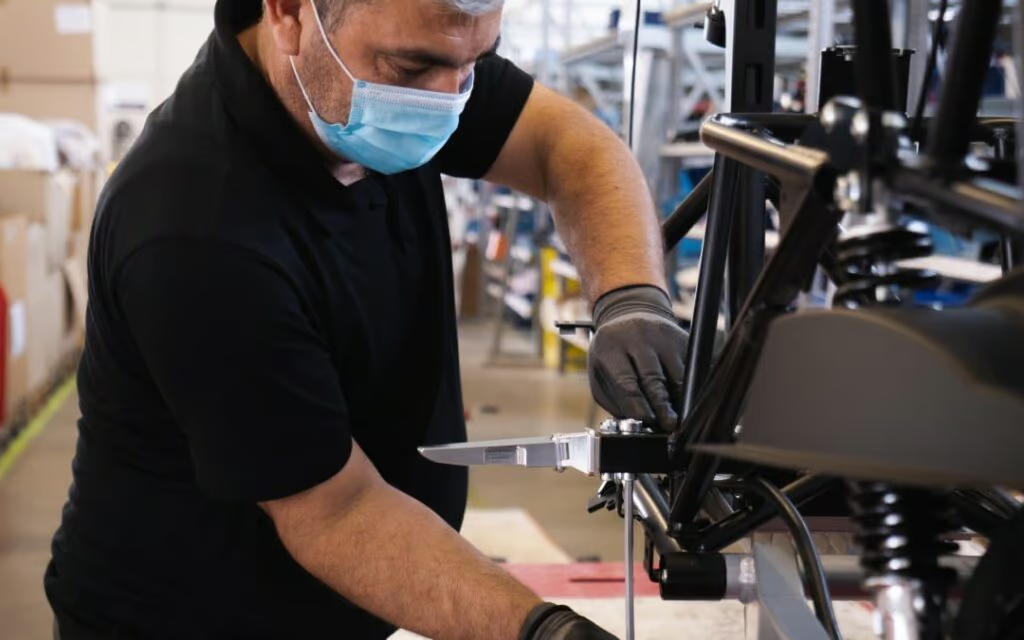
Ergonomics increases employee morale and supports a strong culture of safety. When a company invests in ergonomic initiatives, it shows a clear commitment to the health, safety, and well‑being of its employees. This commitment is not only noticed but also genuinely appreciated by the workforce.
Ergonomics also enhances workplace productivity and efficiency. These initiatives are implemented not just to prevent injuries but to create a more effective workspace and improve workflow. By promoting better working postures, reducing unnecessary movements, and lowering physical strain, ergonomics contributes to smoother operations and higher overall productivity.
Review of ergonomics in different fields of industrial design
A: Ergonomics in product design
Ergonomics improves employee morale and strengthens a culture of safety in the workplace. When organizations invest in ergonomic initiatives, they demonstrate a clear commitment to the health, safety, and well‑being of their employees. Such efforts are typically recognized and appreciated by the workforce, contributing to a more positive and supportive work environment.
Ergonomics also improves workplace productivity and efficiency. These initiatives are implemented not only to prevent injuries but also to create more effective workspaces and improve workflow. By encouraging proper working postures, reducing unnecessary movements, and minimizing physical strain, ergonomics supports smoother operations and higher overall productivity.
So, how do we know what is truly ergonomic? Ergonomics examines the interaction between humans and their surroundings, specifically the various elements within it (such as tools, equipment, etc.). In most cases, there may not be a single “one-size-fits-all” answer in ergonomics. The proper ergonomic design of a product goes beyond just adding a padded handle. To be truly ergonomic, designers, manufacturers, and certainly consumers must consider two definitive factors:
- Human anthropometrics, workstation design, and the specific methods of using a particular product.
- Does this product help minimize risks, including strain, repetition, and awkward postures?
It is difficult to have a definitive way of knowing whether a product is ergonomic or not, but at the very least, with these few guidelines, we can strive to be more astute and informed consumers.
- What makes this product different from other products on the market?
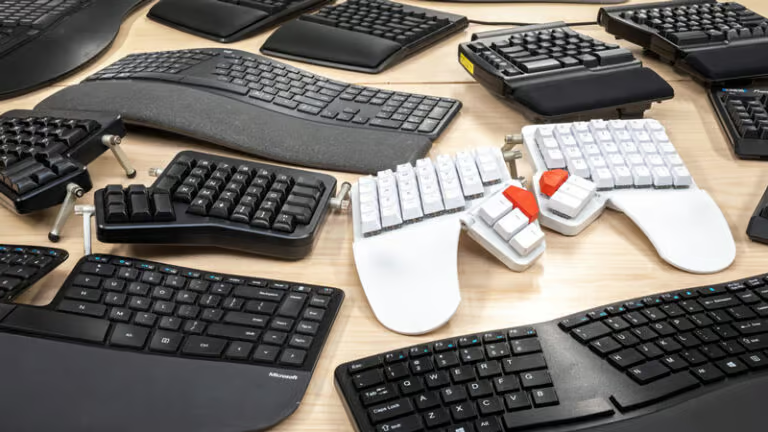
If a product claims to be ergonomic, there should be clear differences from previous models. For example, a curved or wave-shaped keyboard is often marketed as “ergonomic.” Its shape is clearly different from a standard keyboard. A shovel with a curved handle may also claim to be “ergonomic” to reduce back pain. The handle’s shape certainly changes the way the shovel is held. But let’s move on to question 2.
2. How will this product change the way the user interacts with the equipment?
If a product claims to be ergonomic, there should be clear differences in how users interact with it compared with a standard version. If the ergonomic product still requires the same awkward movements or forceful exertions as its previous model, it may require further evaluation, and the claim of being ergonomic may ultimately prove to be misleading.

A wave-shaped keyboard changes the angle of the wrists while typing. A curved shovel handle alters the way a user holds the shovel and moves the snow. A trackball mouse reduces shoulder movement during use, and an ergonomic pen requires a different style of grip.
3. What discomfort or symptoms might this product reduce?
When a product claims to be ergonomic, there is often an expectation that it should help reduce injury. However, there is no single solution that works for every type of injury.
A keyboard labeled “ergonomic” may not actually work for everyone. Its wave-style design may improve wrist posture for users with broad shoulders and large hands. However, it may actually worsen wrist posture for a smaller user. It may also increase the reach to the mouse because of the keyboard’s wider layout. A shovel with a curved handle may help improve body posture when lifting snow, but what about when you simply need to push the snow to the side? Just because a product is marketed as “ergonomic” does not necessarily mean that all of us should use it, or that it will work in every situation.
Consider the steps mentioned above to ensure that the product truly addresses a concern or injury and helps achieve a “fit between the worker and the task.” Understand what may be required for a particular person or a specific task, and then choose the product that best matches those needs. Make sure that all users know how to use the product and equipment correctly. Getting used to it may take time, but improper use can lead to frustration and inefficiency, and may even result in additional strain and injury. Being a smart and informed consumer is the key to making the right choice.
Examples of Ergonomic Products
- Posturite Ergonomic Workstation
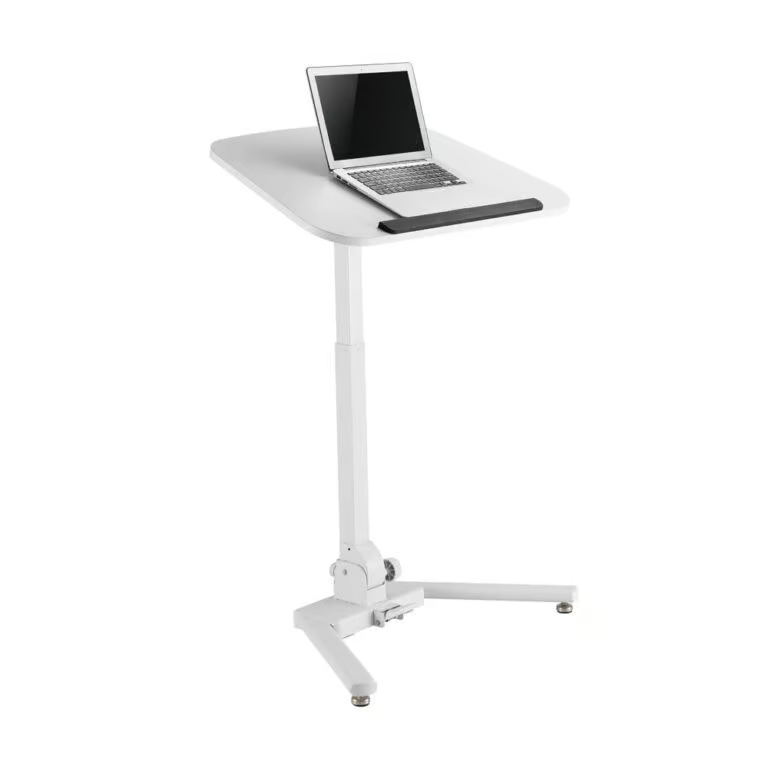
Ergonomic office desks are an excellent example of this type of design process. For instance, during the day we sit at our desks for long periods of time. A typical workday in an office is at least seven hours, which means sitting in the same position for seven hours. For this reason, your office desk should provide maximum comfort and usability. If you have a desk that is poorly positioned or causes discomfort, your workdays can become a nightmare.
The main ergonomic feature is the height-adjustment mechanism, which allows you to easily adjust the desk height according to your body height and posture. In addition, you can also convert it into a standing desk if desired. Furthermore, the desk is spacious and made from strong yet comfortable materials, ensuring that your wrists and arms will not be strained throughout the day.
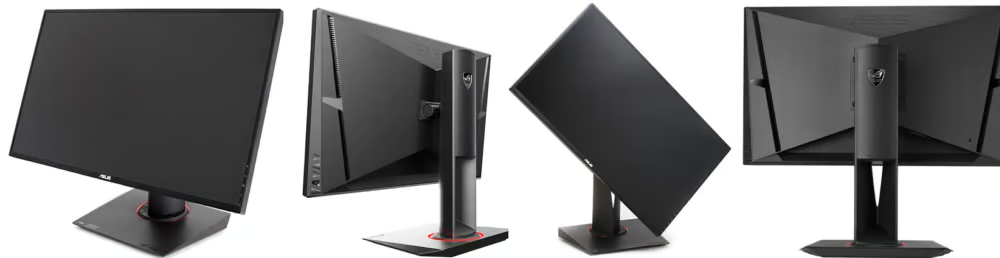
- ASUS Ergonomic Monitor
We regularly use monitors in our daily lives. In general, a monitor should be ergonomic. If you look at a monitor for long periods, it should not strain your eyes. In addition, it should not put pressure on your neck or back.
ASUS is a leading manufacturer of computer accessories such as monitors, keyboards, and storage devices. This monitor is an excellent model with many ergonomic features. In addition to enhanced display quality and refresh rate, its stand is highly flexible. It offers swivel, tilt, and pivot functions. Moreover, you can easily adjust the height. Essentially, you can position it exactly where you need it to ensure maximum comfort.
- Microsoft Ergonomic Mouse
Microsoft is not primarily known for ergonomic products. However, they offer a range of devices that provide exceptional levels of comfort and ergonomics.
This product is an ergonomic mouse. When using a computer for office tasks, your mouse should be comfortable. Using a mouse can put strain on your fingers and wrist. You need to hold the mouse in your hand and repeatedly click with your fingers, which falls under repetitive movements that, if continued over time, can cause serious injury.

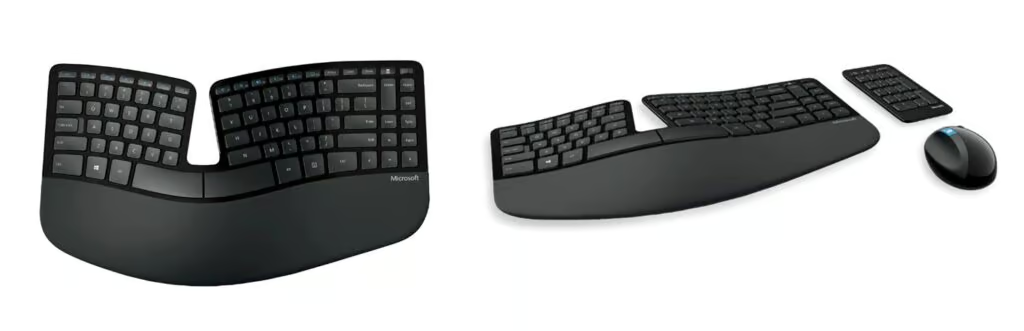
- Microsoft Ergonomic Keyboard
This is the second Microsoft product on our list, accompanying the Sculpt ergonomic mouse. You can use these two together for maximum comfort when working on a computer at the office or at home. Typing on a keyboard can place similar strain on your wrists and fingers as using a mouse. You should position your arms so that your wrists remain comfortable and your fingers can type without excessive pressure.
The Microsoft ergonomic keyboard has an unusual but effective design. The keyboard is divided into two sections: the main keyboard and the numeric keypad. This means you can position the two parts in a way that maximizes arm comfort.
In addition, the keyboard has a natural curve that positions the wrists to create the least amount of strain. It also includes tilt adjustments, allowing you to raise or lower the keyboard depending on the size of your wrists and hands. This is truly an ergonomic design that can maximize your work efficiency while minimizing strain and fatigue. If you work long hours with a computer, this keyboard can significantly reduce fatigue and work-related injuries.
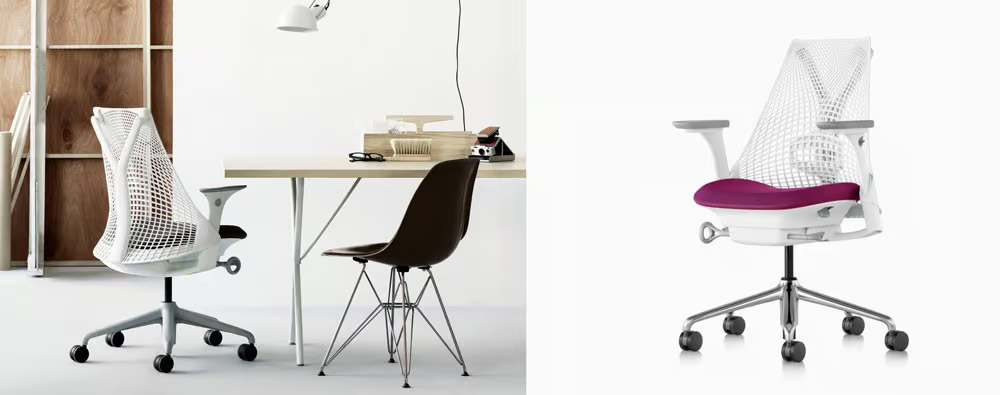
- Herman Miller Ergonomic Chair
Herman Miller is a well-known company that produces a range of ergonomically designed chairs. The Sayl model may appear simple, but it has been skillfully designed with comfort and injury reduction in mind. The developers of this product paid close attention to the shape of the spine and our typical sitting postures.
The backrest is actually “intelligent.” Its mesh structure can conform to the shape of your spine to provide maximum comfort. This allows you to move freely while ensuring that the support forms exactly where you need it. These mesh materials are typically made from polyester, nylon, or spandex.
In addition, the supports can be adjusted in terms of height and tilt, allowing you to position them to complement your posture. The seat itself also features excellent cushioning and remains comfortable during long periods of sitting. We were impressed by the level of detail that went into the design of this product—it is clear that Herman Miller understands the importance of ergonomics.
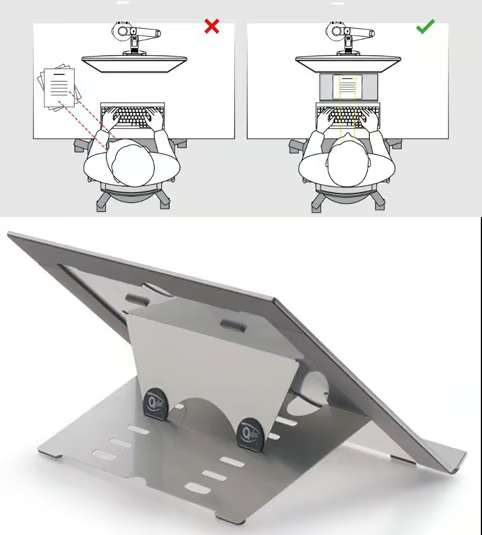
- Q‑Doc Document Holder
This product may seem unusual, but it features an ergonomic design. This holder is used to place paper on it so that it can be read more comfortably. By using such an accessory, you can reduce strain on your neck and eyes. Without a holder, you would simply place the paper on your desk and look downward, which can strain your neck.
This holder has an ergonomic design and can really help with transcription and reading documents. Because it has an ergonomic back support, the angle can be adjusted to six different positions. In addition, it can be fully folded for easy transport. If desired, this document holder can even be used as a tablet stand.
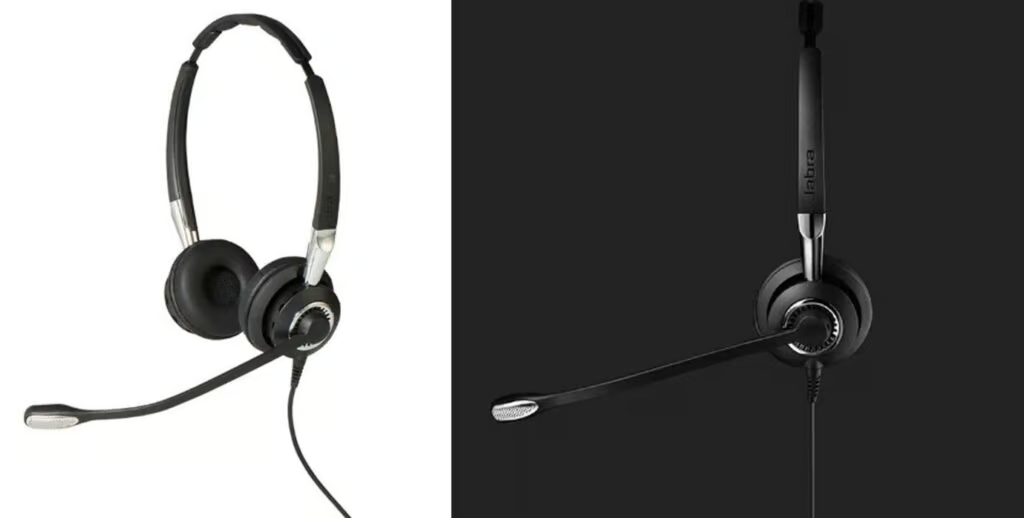
- BIZ 2400 Ergonomic Headset
People who work in call centers or sales teams may need to use a headset. Using a headset can be uncomfortable for your head and ears. In addition, if the headset is heavy, it can put strain on your neck. Jabra addressed these issues when designing the BIZ 2400 ergonomic headset.
This ergonomic product comes with a range of useful features that improve the user experience. To begin with, the earphones are noise‑canceling, which means you won’t be disturbed by surrounding noise. Next, the headset offers three different wearing options: a neckband, a headband, and an ear hook. You can choose whichever option is the most practical and comfortable for you. Finally, the headset is lightweight and sits comfortably on your head. Jabra has created an excellent product that offers maximum usability and flexibility for the user.
- ShutterGrip
You may have noticed how awkward it can be to take photos with a smartphone. If your hands are shaky, trying to reach the shutter button while keeping the phone steady at the same time can be a nightmare. Who would have thought there would be an ergonomic device to solve this problem?
The brand Just Mobile creates countless useful gadgets and accessories for smartphones, and the ShutterGrip is a perfect example. This shutter attaches to your smartphone and acts as a button for your camera. Its design and format mimic the shutter button on a DSLR camera, making it very simple to use. The device can be adjusted to fit various phone models.
Furthermore, it is designed for ambidextrous use. It also features a non-slip grip that allows you to hold both the device and your smartphone comfortably.

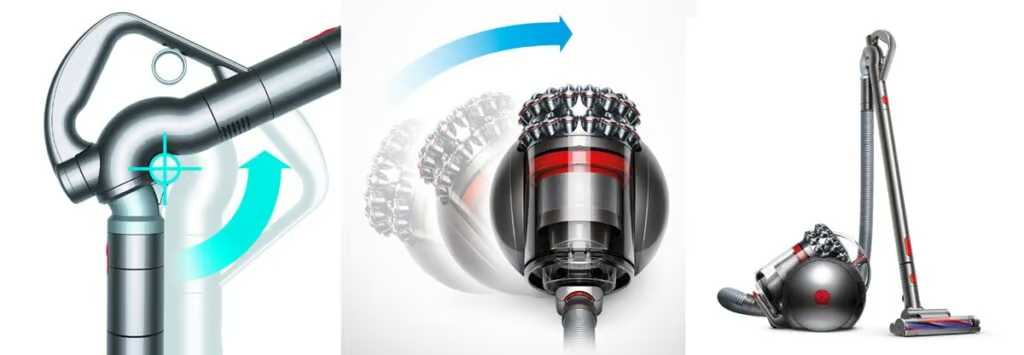
- Big Ball Vacuum Cleaner
We have all used vacuum cleaners that were difficult to handle—older models that were not designed with ergonomics in mind. They were bulky, hard to maneuver, and placed unnecessary strain on your back and arms. Fortunately, companies like Dyson have pioneered ergonomic vacuum cleaner design.
Using the Big Ball vacuum cleaner is a pleasure. It has a compact body that moves around easily. In addition, the vacuum’s handle can be adjusted to the proper height, which means you do not need to bend over while vacuuming.
Furthermore, the wand has several different sections that can make cleaning specific areas easier. Everything about the Big Ball has been carefully engineered with usability in mind.
C. Ergonomics in Packaging Design
When it comes to product packaging, what appears on the outside can be just as important as what is inside. Packaging not only protects products but also plays a key role in marketing them. For many consumers, packaging is the first point of interaction with a brand and often the element that captures attention on the shelf.
Consumers’ attention can be captured by achieving the right balance between aesthetic and ergonomic considerations. There is no universal approach to product packaging, and the fact that other brands package their products in a certain way does not necessarily mean your brand should do the same. Innovative and ergonomic packaging can provide a valuable competitive advantage.
Ergonomic packaging is designed to ensure that consumers can use a product efficiently and comfortably. Such designs take into account several human factors, including ease of access to the product, grip and handling, as well as the size and shape that support natural interaction.
Overall, ergonomic packaging addresses important questions: How easy is it to lift, hold, and open? Is the size and shape comfortable to handle? How easily can it be stored or carried to the place of use?

1. Use clear and visible cues on the packaging to show how it works
As the team responsible for designing your product packaging, you understand the purpose of each component and how it functions. It is equally important to ensure that customers clearly understand the role of these elements and can easily recognize how to handle, open, remove, and dispense the product correctly.
Packaging should clearly show how it is used. Include visual and tactile cues to help customers when interacting with your product.

2. Assess the abilities of your target audience
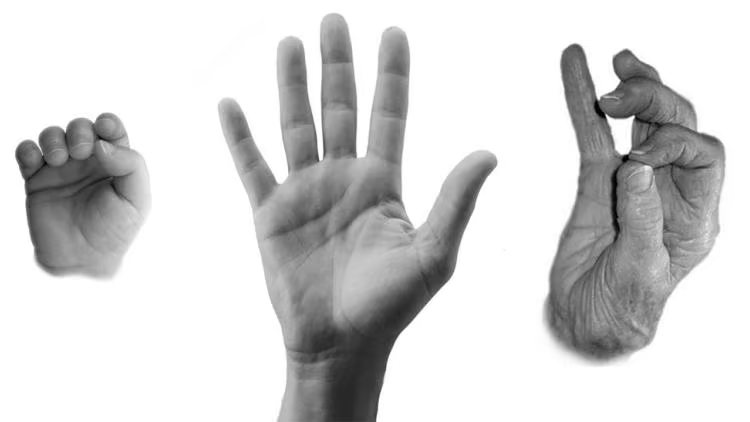
The demographic profile of your target market demands careful consideration within the packaging design process, as physical capabilities vary significantly across different age groups. Older adults, for instance, may contend with reduced grip strength, limited joint flexibility, and visual impairments, all of which create tangible barriers to effectively handling, opening, and reading product packaging. Similarly, young children often lack the fine motor skills or physical strength required to manipulate heavy containers or operate complex closures.
Consequently, successful packaging design must be intentionally aligned with these specific user needs; by prioritizing accessibility through strategies such as utilizing larger, highly legible typography, ensuring high visual contrast, and selecting materials that are both intuitive and practical, brands can significantly enhance the consumer’s interaction with the product and foster greater accessibility for all users.
3. Consider environmental factors
Inadequate or faulty packaging can often lead to environmental consequences and concerns. While the lifespan of packaging is relatively short, it must provide value throughout its lifecycle—from storage to protection and delivery.
Another unique factor to consider when designing ergonomic packaging is the product’s storage environment. For example, ergonomic packaging design for frozen and refrigerated goods faces more constraints. One way to package refrigerated items is by using squeezable packaging, as this design allows fingers to wrap around the container, making it easier to hold.
4. For items that need to be gripped, make sure the surface has a suitable texture
Rounded product geometries—such as bottles, cans, and jars—often present significant ergonomic challenges, particularly when the packaging material possesses a glossy or inherently slippery finish. To ensure optimal usability and user safety, it is imperative to engineer the hand-contact surfaces of cylindrical containers with tactile considerations that enhance friction and provide a secure, comfortable grip, thereby ensuring the user can interact with the product confidently and without strain.

5. Conduct sufficient real-world testing to determine whether your product passes ergonomic requirements
Real consumer feedback and experiences provide valuable insights into research-based design and the overall success of a product launch. Use a sample group from your target audience to provide feedback on your packaging options. Measure relevant criteria such as attractiveness, quality, uniqueness, purchase intention, design, and ease of use.
For example, you can compare two different packaging designs of a mayonnaise product to determine which one is easier to open and close. Feedback can also help determine whether other changes could make the packaging more ergonomic and more practical.
Ergonomics is key to creating products people love to use. At Ekas Design, we turn human-centric insights into functional, market-ready products. Contact us today to bring your product vision to life.
conclusion
The fundamental objective of ergonomics is to align product design with the nuances of the environment and user behavior. These principles are equally vital for both physical and digital product development. While the aforementioned guidelines offer a robust framework for user-friendly design, specific ergonomic requirements must be tailored based on comprehensive UX research and market analysis. It is crucial to recognize that poor ergonomics should not be conflated with poor overall design; rather, ergonomics exists as one of many competing priorities within the development lifecycle. Designers must continually balance ergonomic efficacy against aesthetic appeal, market demand, and budgetary constraints—factors which ultimately dictate material selection and manufacturing components.
Because relevance varies by context, it is neither practical nor mandatory to apply every ergonomic principle to every design. Fundamentally, poor ergonomics signifies a breakdown in the alignment between the environment, the task, and the equipment. For instance, a formal dining chair may be perfectly suitable for its intended, intermittent use, yet prove problematic in a professional office setting where prolonged, static sitting necessitates specialized lumbar support and ergonomic adjustability.